How we checked: every price and feature for other sites below is what their own public pages showed when we visited them on November 6, 2026 (simchaseen.com and balsimcha.com). We checked SimchaSeen again on November 8, 2026; facts we re-checked or that changed say "Nov 8". Prices and features change, so check each site before you order. If something here is out of date, tell us and we will fix it.
SimchaSeen and Simcha Invites both let you make a heimish simcha invitation online: you pick a design, type the names and details, see a live preview and download the finished card. They are built for the same families and the same simchas, so the differences come down to price, what is included, and extras. This page lays those differences out using only what each site showed on November 6, 2026.
Quick comparison
| Simcha Invites | SimchaSeen | |
|---|---|---|
| Price per invitation | $15 flat | $29.99 on the design we opened (a Vachnacht, code VN-N051); also $29.99 on the two designs we opened on Nov 8 (VN-CBR03 and a Tenoyim) |
| Files included | Print PDF + full-quality JPG (2550 px, 300 dpi) + small JPG for texting (under 1 MB) | High-resolution PDF + an image (About page) |
| Extras sold | Animated GIF +$3 (optional) | Smart QR invite (unlocked after purchase), background music, animated video |
| AI design option | No | "Design using SimchAI" shown in the editor |
| Checkout buttons | One button, one price | Add to Cart and Buy Now |
| Simchas covered | Sholom Zucher, Vachnacht, Pidyon Haben, Kiddush, Tenoyim, Bar Mitzvah, Bavarfen, Sheva Brachos, Siyum | Bris, kiddush, upsherin, bar mitzvah, tenoyim, bavarfen, wedding, sheva brachos (About page) |
| Languages | Yiddish, Hebrew, English | Hebrew and English with bidirectional text (About page) |
| Layout of the design page | Card preview beside the form; card on top on a phone | Editor with Phone, WhatsApp and Email views |
At these prices, one invitation on Simcha Invites costs $14.99 less, about half. If you make several invitations a year (a sholom zucher, then a kiddush for a sister, then a bar mitzvah), the difference adds up.
Where SimchaSeen offers more
We want this page to be useful, so here is what SimchaSeen has that we do not:
- Wedding and upsherin designs. Its About page lists both. We do not offer weddings or upsherin today.
- Video and music. SimchaSeen describes an animated video version and background music for sharing in family groups.
- A live event page. Its smart QR code links guests to a live event page.
- An AI design option. The editor showed "Design using SimchAI".
If any of those matter to you, SimchaSeen is worth a look.
Where Simcha Invites is different
One price, three files
Our price is $15 and it does not change. There is nothing to add to a cart. Every paid order includes three files: a print-ready PDF for a printer, a full-quality JPG (2550 px wide, 300 dpi) for sharp prints, and a small JPG under 1 MB for WhatsApp, text messages and email. The PDF is one flat image, so the layout looks exactly like the preview on every printer.
A form that asks only what your simcha needs
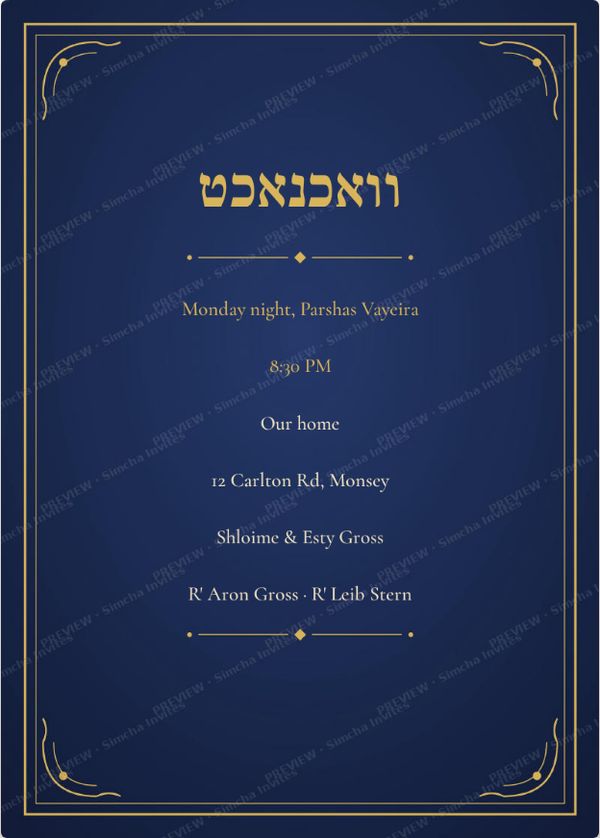
Each simcha has its own fields. A sholom zucher asks for the day or parsha, time, place, address, parents and grandparents. A tenoyim asks for chosson, kallah, date, time, hall and address. The Hebrew heading, such as שלום זכר or תנאים, is part of the design, so it is always spelled and placed correctly.
Yiddish as well as Hebrew
Many heimish invitations mix lashon kodesh and Yiddish. Our designs and our wording guides include Yiddish wording, not only Hebrew and English.
A preview you can trust
While you type, the card updates beside the form (on a phone it sits on top). The preview carries a faint "PREVIEW" watermark so the design can't be copied for free; once the order is paid, the clean files download without it.
Step by step: making the same invitation on each site
Both sites follow the same basic path: choose the simcha, choose a design, fill in the details, check the preview, pay, download. On Simcha Invites you go from the home page to the simcha, then to the design page, place the order, and the thank-you page shows the three download buttons (PDF, Full quality, Small for texting). On SimchaSeen the editor page we opened offered the editor, the preview tabs, Add to Cart and Buy Now, and the smart QR invite as an add-on.
Which should you choose?
If you want the invitation itself, beautifully set in Hebrew or Yiddish, for WhatsApp and for the printer, at the lowest price, Simcha Invites does exactly that for $15. If you want a wedding design, a video, music or a live event page, SimchaSeen offers those. Both are made for heimish families, and the best test is simple: open a design on each site, type your own names, and see which card you like more.
JPG or PDF: which file do you need?
A JPG is a picture. It opens on every phone, it can be sent on WhatsApp in one tap, and it can be printed at home. A PDF is the file printers prefer, because it keeps the page size exact. When a PDF holds one flat image, as ours do, there is nothing to shift or reflow, so the print looks the same as the preview. If you plan to send the invitation only on WhatsApp, the JPG is all you need; if you are going to a printer, bring the PDF.
| Use | Best file | Why |
|---|---|---|
| WhatsApp, text message | JPG | Opens instantly as a picture |
| JPG or PDF | Both open on any phone or computer | |
| Print a few copies at home | JPG or PDF | Either prints well at full size |
| Printer or copy shop | Exact page size | |
| Shul notice board | Print once, pin it up |
What to look for in any invitation site
- Hebrew that is set properly. Letters, nekudos and abbreviations like נ"י should sit on the line correctly, right to left, without broken punctuation.
- A preview on the phone. Most guests will see your card on a phone, so check it there before you pay.
- Clear pricing. Know the total before checkout, including any extras.
- Both a picture and a print file. A JPG for WhatsApp and a PDF for the printer, ideally in the same price.
- Fields that match your simcha. A tenoyim needs both sides' names; a kiddush needs the shul and the parsha.
- Fast delivery. For a sholom zucher you may have only a day or two.
SimchaSeen, Simcha Invites and the rest of the market
SimchaSeen is one of many heimish invitation sites. On November 6, 2026 we also checked the others below, and re-checked them on November 8. For every detail, see our 10-site comparison.
| Site | Price seen (Nov 6, 2026) | Catalog |
|---|---|---|
| Heimish Invites (heimishinvites.com) | $9.99 per design (their FAQ, Nov 8) | 274 templates |
| InviteWithClass | Mostly $10.95–$10.99 (Nov 8) | 111 designs in its store (Nov 8) |
| Simcha Invites (this site) | $15; animated GIF +$3 | 19 designs (Nov 8) |
| BalSimcha | $27.99 on every design listed (Nov 8) | 209 on its designs page (Nov 8) |
| SimchaSeen | $29.99 on the designs we opened (Nov 6 and 8) | Not counted |
| Hazmoona | $29.99 on nearly all Baby Boy designs (Nov 8) | Detailed categories + custom |
| I Hope To See You | $30 on the design we opened; music +$5 | Many occasions + custom |
| YidCards | $30–$35 (Bar & Bas Mitzvah) | 103 Bar & Bas Mitzvah templates |
At $29.99 for the design we opened, SimchaSeen is at the higher end, close to Hazmoona, I Hope To See You and YidCards. Simcha Invites costs about half that ($15). Two sites charge less than we do: Heimish Invites at $9.99 and InviteWithClass at its $10.99 sale price.
SimchaSeen's extras, explained
On November 6, 2026 SimchaSeen offered three extras beyond the card itself. Here is what each one does and the closest thing on Simcha Invites:
| Extra | What it is | On Simcha Invites |
|---|---|---|
| Smart QR invite | A QR code (unlocked after purchase) that guests scan to open the event details | Not offered |
| Background music | Music that plays with the invitation | Not offered |
| Animated video | A moving video version of the invitation | Animated GIF +$3: the same card as a moving picture, with your text on every frame, on designs that have one |
A GIF and a video are not the same thing. A GIF has no sound. It plays by itself in a WhatsApp chat and is a small file, so it loads fast even on a weak connection. A video can have music and run longer, but it is a bigger file and guests have to tap to play it. If you want music, SimchaSeen's video is the better fit. If you want a light moving version for WhatsApp and status, a GIF is enough.
Typical orders, side by side
| Order | Simcha Invites | SimchaSeen |
|---|---|---|
| One invitation (JPG/image + PDF) | $15.00 | $29.99 on the design we opened |
| Invitation + moving version | $18.00 with animated GIF | $29.99 + animated video (price not recorded) |
| Three simchas in a year, cards only | $45.00 | About $89.97 at $29.99 each |
Fonts and how the card looks
Heimish invitations depend on their lettering. A sholom zucher card in a heavy display font feels very different from one in a light classic serif. SimchaSeen sets its designs with its own fonts. On Simcha Invites the design comes with the fonts the designer picked, and you can change them. One dropdown changes the whole card, or you can pick a different font for any single text box and make it bigger or smaller with A−/A+. There are more than sixty free Hebrew and English fonts to choose from, including Frank Ruhl Libre, David Libre, Suez One, Secular One, Bellefair, Noto Rashi Hebrew and the Culmus set (Keter YG, Taamey Frank, Shmulik, Stam Ashkenaz and others). The final files use whatever you picked, so the download looks the same as the preview.
Previews, watermarks and your files
Like most invitation sites, Simcha Invites marks its previews so they cannot be used without paying. The preview is a smaller picture with faint "PREVIEW" marks built into it, and the clean full-size design stays on our server until the order is paid. After payment you get the clean print PDF, the full-quality JPG (2550 px, 300 dpi), the small JPG for texting (under 1 MB), and the GIF and a small GIF if you chose it. A "flat" PDF holds one image, so a printer prints exactly what you saw, and nobody can pull the text or background apart.
Who should choose SimchaSeen
- You want music or a video version of the invitation.
- You like the idea of a QR code guests can scan.
- You are making a wedding or an upsherin, which Simcha Invites does not cover today.
Who should choose Simcha Invites
- You want a beautiful card for a sholom zucher, vachnacht, pidyon haben, kiddush, tenoyim, bar mitzvah, bavarfen or sheva brachos at about half the price.
- You want a print PDF, a full-quality JPG and a small texting JPG included.
- You want to pick the font and text size for each text box.
- You want a moving GIF for just $3 more.
Five mistakes families make with online invitations
- Typing names straight into the form. Write the text in a note first and have someone in the family read it.
- Forgetting the title of a grandparent. Titles like הרה"ח, מו"ה and הי"ו matter to the family. See our Sholom Zucher wording guide for full examples.
- The wrong Hebrew date at night. A Friday night or Motzei Shabbos simcha already falls on the next Hebrew date.
- Too much text on one line. The letters shrink to fit. Split long lines.
- Sending only a PDF to WhatsApp. Many guests will not open a PDF. Send the JPG (or GIF) in the chat, and keep the PDF for printing and email.
Using the invitation once you have it
The file is only half the job. Here is how families usually send each kind:
| Where | Best file | Tip |
|---|---|---|
| WhatsApp family group | JPG (or GIF) | Send the picture first, then a short line of text with the address, so guests can tap it into a map. |
| WhatsApp status | GIF or JPG | A moving GIF stands out in a list of statuses. |
| PDF + JPG | Attach both: the PDF for printing, the JPG for a quick look on the phone. | |
| Printed copies for shul | Ask the printer for card stock. Our PDF is sized for a 6 × 8.4 inch card at 300 dpi. | |
| Guests with simple phones | JPG by MMS, or printed | A short text message with the time and address helps too. |
Keep the thank-you page link. On Simcha Invites you can open it again later and download the same files, which helps when a cousin asks for "the nice version" a week later.
How long does each take?
On both sites a ready-made design takes minutes, not days. Most of the time goes into the wording. On Simcha Invites the steps are: choose the simcha, choose a design, clear the sample text, type your lines (the card updates as you type), choose fonts if you want, add the GIF if you want, then place the order and pay. The download buttons appear on the thank-you page as soon as the payment goes through. If you are not sure about a line, you can leave the page and come back. The text you typed stays in that browser until you close it.
Custom work is different. If no template fits, a custom design from a designer (Hazmoona and I Hope To See You both offer one) takes longer and costs more. It can be worth it for a wedding or a big bar mitzvah.
Related guides
- Best heimish simcha invitation sites 2026
- Simcha Invites vs BalSimcha
- How much does a simcha invitation cost?
- Vachnacht invitation wording
What was new on SimchaSeen on November 8, 2026
When we checked again, SimchaSeen's home page showed three features marked NEW:
- Text Your Invite. In its words: "Send your finished invitation as a text message — your guests tap once and see it in full, right on their phone." We did not test it.
- Change your background. "Switch the same invitation between several background scenes — and change the text color to match. Your wording stays exactly where you put it."
- SimchAI. "Open any invitation and tell SimchAI what to change: colors, flowers, backgrounds."
Its menu also listed חתן בראשית and "Others" beside the simchas. These are real options that Simcha Invites does not have: our designs have fixed colors and backgrounds, and you send the file yourself.
Choose by situation
- You want the card on WhatsApp tonight at the lowest price of the two: Simcha Invites, $15.
- You want the site to send your invitation as a text message: SimchaSeen's new Text Your Invite.
- You want to change the design's colors or background: SimchaSeen.
- You want a live event page or a video: SimchaSeen (smart QR invite, animated video, music).
- Guests on flip phones: Simcha Invites' small texting JPG (under 1 MB) is in the $15.
- A wedding or upsherin card: SimchaSeen. We have no designs for these yet, but our chasuna wording guide can help with the text on any site.
- A tenoyim with a decorative frame: both have Tenoyim designs; ours include 10 "Tenoyim Frame" designs in the Tenoyim category.
Frequently asked questions
Is Simcha Invites cheaper than SimchaSeen?
On November 6, 2026 the SimchaSeen design we opened was priced $29.99. Simcha Invites charges $15 per invitation, with the PDF and both JPGs included.
Does SimchaSeen have features Simcha Invites doesn't?
Yes. SimchaSeen describes wedding and upsherin designs, a smart QR code to a live event page, background music, an animated video version and an AI design option. Simcha Invites does not offer those today.
Can I print an invitation from Simcha Invites?
Yes. Every paid order includes a print-ready PDF for a printer and a full-quality JPG (300 dpi) you can print at home, plus a small JPG for texting.
Does Simcha Invites have a video invitation?
Not today. It has an animated GIF version for +$3 on designs that have one. SimchaSeen offers animated video and background music.
Can I change the font on my invitation?
On Simcha Invites, yes: for the whole card or for each text box, from more than sixty free fonts, with A−/A+ to change the size. The final files use the fonts you picked.
Is SimchaSeen more expensive than Simcha Invites?
On November 6, 2026 the SimchaSeen design we opened was $29.99, and a Simcha Invites invitation was $15 ($18 with the animated GIF).
Can SimchaSeen send my invitation by text?
On November 8, 2026 its home page showed a new "Text Your Invite" feature for sending the finished invitation as a text message. Simcha Invites gives you a small texting JPG under 1 MB to send yourself from your phone.
Can I change the background color of a design?
On SimchaSeen, yes: its "Change your background" feature switches between background scenes and text colors. Simcha Invites designs keep their own colors; you choose the font and size of each text box.
How many designs does Simcha Invites have?
19 on November 8, 2026, 11 of them for Tenoyim. We did not count SimchaSeen's designs.